ChatGPTのUI改善
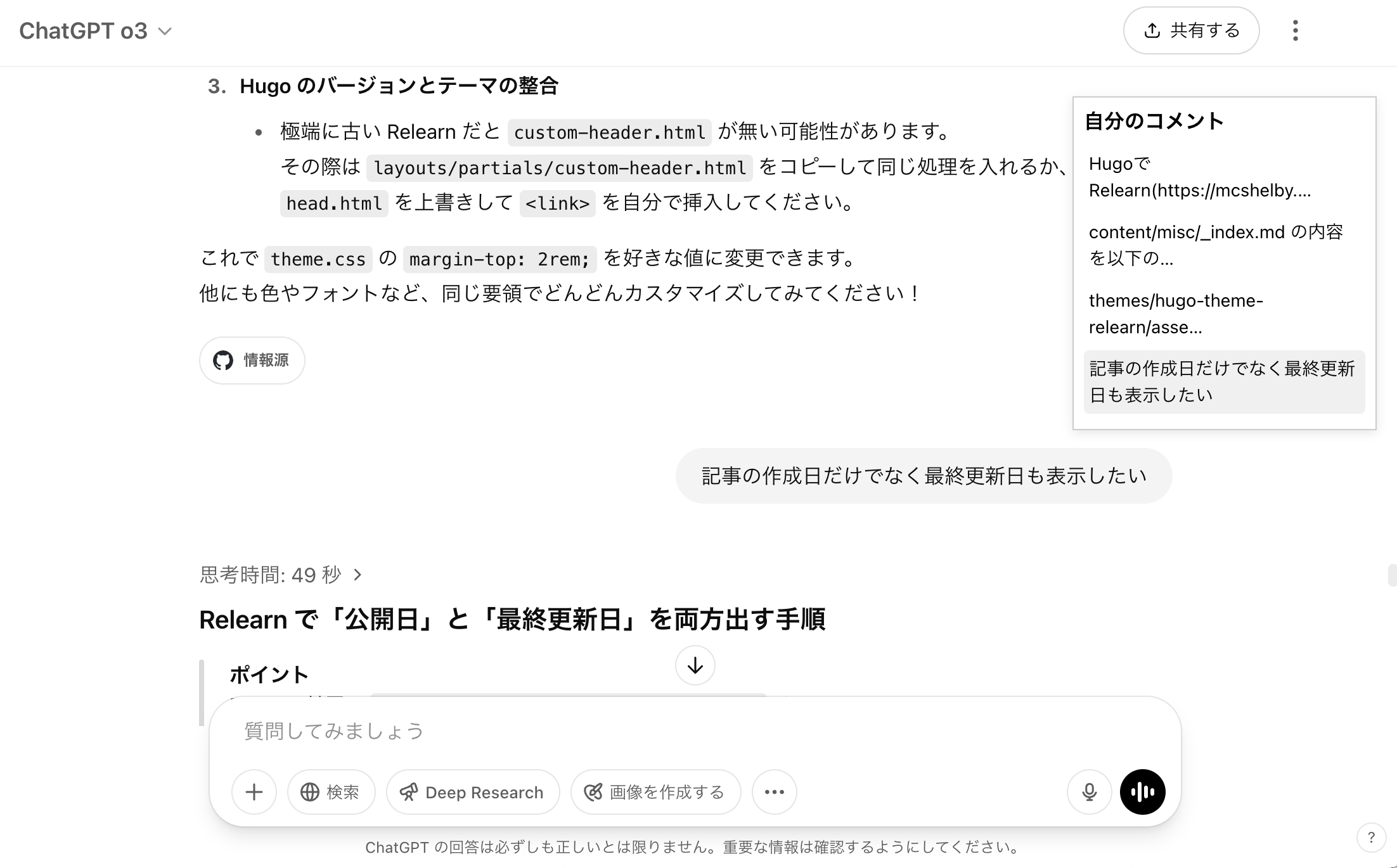
自分のコメント一覧パネルを追加
ChatGPTでチャットが長くなると、自分のコメントを探すのが難しくなります。そこで、自分のコメント一覧パネルを追加し、クリックするとジャンプする機能を追加しました。
スクリーンショット
インストール
上級者向けです
Tampermonkeyはハイリスクです。
自分が何をやっているか十分に理解していない限りはインストールしないでください。
- ChromeにTampermonkey拡張機能をインストール
- 以下のスクリプトを追加
<追記:2025-04-28> 🔀ボタンでパネル位置を変更できるように修正
// ==UserScript==
// @name         ChatGPT 自分のコメント一覧パネル(位置トグル付き)
// @namespace    http://tampermonkey.net/
// @version      0.2
// @description  クリックで左右切り替えできる自分のコメントパネル
// @author       ChatGPT&らいあん
// @match        https://chatgpt.com/c/*
// @match        https://chatgpt.com/g/*/c/*
// @grant        none
// ==/UserScript==

(function() {
  'use strict';

  // ----- CSS 定義 -----
  const style = document.createElement('style');
  style.textContent = `
    #tm-user-panel {
      position: fixed;
      top: 80px;
      right: 20px;   /* 初期表示は右 */
      width: 240px;
      max-height: 75%;
      background: #fff;
      border: 1px solid #ccc;
      padding: 8px;
      box-shadow: 0 2px 8px rgba(0,0,0,0.1);
      overflow-y: auto;
      z-index: 9999;
      font-size: 14px;
      transition: right .2s ease, left .2s ease;
    }
    #tm-user-panel.left {
      left: 20px;
      right: auto;
    }
    #tm-user-panel h3 {
      margin: 0 0 8px;
      font-size: 16px;
      display: flex;
      align-items: center;
      justify-content: space-between;
    }
    #tm-user-panel .toggle-icon {
      cursor: pointer;
      font-size: 16px;
      padding: 2px;
      user-select: none;
    }
    #tm-user-panel .tm-item {
      margin: 4px 0;
      cursor: pointer;
      padding: 4px;
      border-radius: 4px;
    }
    #tm-user-panel .tm-item:hover {
      background: #f0f0f0;
    }
    @keyframes tm-highlight {
      from { background-color: #fffb8f; }
      to   { background-color: transparent; }
    }
  `;
  document.head.appendChild(style);

  // ----- パネル生成 -----
  const panel = document.createElement('div');
  panel.id = 'tm-user-panel';
  // 見出しにアイコンを追加
  panel.innerHTML = `
    <h3>
      <span>自分のコメント</span>
      <span id="tm-toggle-icon" class="toggle-icon" title="位置を切り替え">🔀</span>
    </h3>
  `;
  document.body.appendChild(panel);

  // トグル用イベント
  document.getElementById('tm-toggle-icon').addEventListener('click', () => {
    panel.classList.toggle('left');
  });

  // URL チェック(/c/ または /g/.../c/)→必要に応じて表示/非表示
  function updatePanelVisibility() {
    const path = location.pathname;
    const isChat = /^\/c\/[^\/]+/.test(path) || /^\/g\/[^\/]+\/c\/[^\/]+/.test(path);
    panel.style.display = isChat ? 'block' : 'none';
    return isChat;
  }

  // パネル中身リフレッシュ
  function refreshPanel() {
    if (!updatePanelVisibility()) return;
    // タイトル行を残してリセット
    panel.innerHTML = `
      <h3>
        <span>自分のコメント</span>
        <span id="tm-toggle-icon" class="toggle-icon" title="位置を切り替え">🔀</span>
      </h3>
    `;
    // 再度トグルイベントをバインド
    const toggleIcon = document.getElementById('tm-toggle-icon');
    toggleIcon.addEventListener('click', () => panel.classList.toggle('left'));

    // 自分のメッセージ要素を取得
    const userNodes = Array.from(
      document.querySelectorAll('div[data-message-author-role="user"][data-message-id]')
    );
    userNodes.forEach(node => {
      const content = node.querySelector('div.whitespace-pre-wrap')?.textContent || '';
      const text = content.trim().split('\n')[0];
      const label = text.length > 30 ? text.slice(0, 30) + '…' : text;

      const item = document.createElement('div');
      item.className = 'tm-item';
      item.textContent = label;
      item.onclick = () => {
        const article = node.closest('article');
        if (article) {
          article.scrollIntoView({ behavior: 'smooth', block: 'center' });
          article.style.animation = 'tm-highlight 2s ease';
        }
      };
      panel.appendChild(item);
    });
  }

  // 定期実行&SPA対応
  window.addEventListener('popstate', refreshPanel);
  ['pushState','replaceState'].forEach(fn => {
    const orig = history[fn];
    history[fn] = function() {
      const result = orig.apply(this, arguments);
      window.dispatchEvent(new Event('locationchange'));
      return result;
    };
  });
  window.addEventListener('locationchange', refreshPanel);

  setInterval(refreshPanel, 1500);
  // 初回呼び出し
  refreshPanel();
})();
Enterで送信ではなく改行 → 実現できず
Enterで送信、Shift+Enterで改行 という仕様は使いにくいので、これを入れ替えるスクリプトを書きたかったのだが、 ChatGPTと何時間か取り組んだけど実現できなかった。 GreasyForkで公開されているものも試したが、うまく動かず。おそらくHTML要素が変更されているのだと思う。
いったん放置。